Introduction
Modern applications face an escalating threat landscape that traditional perimeter defenses simply cannot address. According to the 2025 Verizon Data Breach Investigations Report, vulnerability exploitation as an initial access vector has surged to 20% of all breaches—a 34% increase from the previous year, driven in large part by zero-day exploits targeting edge devices and VPNs. Firewalls and static analysis tools miss these runtime threats because they lack visibility into what's happening inside the application during execution.
This guide breaks down Runtime Application Self-Protection (RASP) for developers: how it instruments into your application, how it stacks up against WAFs and DAST, and which features matter most. Mobile app developers will also find a dedicated look at why mobile environments demand purpose-built RASP capabilities.
TL;DR
- RASP embeds into your app's runtime, detecting and blocking SQL injection, XSS, and more in real time — no code changes needed
- Unlike WAFs, RASP sees full execution context, producing fewer false positives and stronger zero-day coverage
- Evaluate tools on real-time detection, low overhead, CI/CD integration, and stack compatibility
- Mobile apps face distinct threats (rooting, hooking, reverse engineering) that require mobile-specific RASP
- Pick RASP that fits your deployment model, compliance needs, and application environment
What is RASP and how does it work?
Runtime Application Self-Protection (RASP) is a security mechanism embedded directly within an application's runtime environment. It monitors execution behavior and intercepts malicious actions before they cause damage.
NIST SP 800-53 defines it precisely: RASP "employs runtime instrumentation to detect and block the exploitation of software vulnerabilities by taking advantage of information from the software in execution."
How RASP instruments applications
RASP integrates through agents, SDKs, or library hooks that instrument themselves directly into the application runtime. This gives RASP access to contextual information external tools cannot see:
- Call stacks and execution flows
- Database queries and data access patterns
- File system operations
- Network requests and API calls
- Memory allocation and manipulation
Behavioral analysis vs. signature detection
Unlike signature-based tools that match known attack patterns, RASP understands what the application is doing in context. This behavioral analysis approach identifies anomalous behavior even from previously unknown attacks, providing zero-day protection that signature-based defenses miss.
Operational modes
Developers encounter two operational modes:
| Mode | Behavior | Best Used When |
|---|---|---|
| Monitor | Observes and logs suspicious activity without blocking | Initial deployment, policy tuning, baseline establishment |
| Protection | Blocks or terminates malicious requests in real time | After tuning, once false positive rates are acceptable |
Primary threat categories
RASP defends against:
- SQL Injection: Detects malicious queries attempting to manipulate or exfiltrate database data
- Cross-Site Scripting (XSS): Blocks injection of malicious scripts into web pages
- Remote Code Execution: Prevents attackers from running arbitrary code on the server or device
- Path Traversal: Stops unauthorized file system access attempts
- Command Injection: Identifies and blocks OS-level command manipulation
- API Abuse: Flags abnormal API call patterns that signal automated attacks or credential stuffing
RASP vs. WAF vs. DAST: understanding the differences
| Tool | Where It Operates | When Protection Applies | False Positive Rate | Key Limitation |
|---|---|---|---|---|
| WAF | Network perimeter (external) | Before traffic reaches app | High (52% bypass rate in studies) | No internal application context; rule-based detection |
| DAST | External pre-deployment testing | Testing phase only | Medium | Not a production defense; cannot protect live apps |
| RASP | Inside application runtime | During production execution | Low | Requires per-app tuning; potential performance overhead |
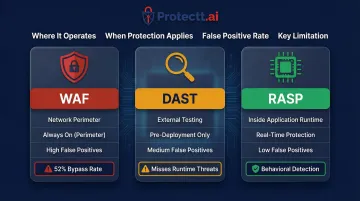
WAF vs. RASP
WAFs inspect incoming traffic at the perimeter using rules and pattern matching. They require frequent updates to address new attack vectors and struggle with attacks that use legitimate-looking requests or bypass perimeter defenses through encoding tricks.
RASP works from inside the application with full visibility into execution context. Because it understands what the code is actually doing—not just what the traffic looks like—it adjusts its response based on live execution state and catches attacks that slip past perimeter defenses.
DAST vs. RASP
DAST simulates attacks from outside the application before release — a "black box" approach that surfaces vulnerabilities during development, not production.
RASP operates continuously after deployment, defending against live exploitation. The two work best together: DAST identifies weaknesses before launch; RASP stops attackers from using those weaknesses while your team works to patch them.
Key features to look for in a RASP
Real-time threat detection and blocking
The tool must identify and stop attacks during active execution with minimal latency. No universal performance overhead threshold exists from NIST or OWASP, but industry consensus points to structured proof-of-concept testing in production-like environments. A 2025 study in the Journal of Systems & Software found throughput decreases of up to 8.4% and latency increases of 20–49% in some microservices. Benchmark your specific workload before production rollout.
Contextual, behavior-based detection
Context-awareness dramatically reduces false positives. A RASP that understands normal versus anomalous behavior in your specific application prevents alert fatigue and avoids disrupting legitimate user flows. The 2025 SANS Detection & Response Survey found that false positives remain the leading challenge, cited by 73% of respondents—up from 64% the previous year.
CI/CD and DevSecOps integration
Security shouldn't bottleneck release velocity. Look for native integrations with:
- GitHub Actions
- Jenkins
- GitLab CI
- Bitrise (for mobile)
- Azure DevOps
These integrations enable policy-as-code and automated security checks within existing pipelines.
Environment and platform compatibility
Coverage must match where your app runs:
- Web applications (Java, .NET, Node.js, Python)
- Cloud-native and containerized workloads
- iOS and Android mobile runtimes
Web-focused RASP don't instrument mobile runtimes, so teams building iOS or Android apps need a purpose-built solution. Protectt.ai's mobile RASP SDK covers both platforms with 100+ security checks and no measurable performance overhead — making it a practical fit for mobile-first teams in banking and fintech.
Compliance and audit reporting
Built-in logging and reporting that maps to regulatory frameworks cuts manual compliance work:
- PCI DSS requirements for payment applications
- OWASP Top 10 vulnerability categories
- GDPR data protection mandates
- Industry-specific regulations (RBI guidelines for banking, FFIEC for financial institutions)
Look for dashboards that surface risk trends, blocked attack patterns, and incident timelines in formats auditors recognize.
RASP for mobile applications: a special consideration
Why mobile requires purpose-built RASP
Mobile apps face threats that don't apply to web servers. Nearly half of all banked households (48.3%) now use mobile banking as their primary account access method—a ninefold increase over the past decade that has dramatically expanded the attack surface.
Mobile-specific threats include:
- Device Rooting and Jailbreaking: Compromised OS-level security controls
- Dynamic Code Instrumentation: Hooking frameworks like Frida that most tested apps fail to detect
- Reverse Engineering and APK Tampering: Attackers decompiling and modifying application binaries
- Malicious Overlays: Fake UI elements capturing credentials
These require purpose-built mobile RASP, not web RASP agents ported to mobile.
Core mobile RASP capabilities
Mobile RASP must provide:
- Anti-Tampering and Integrity Checks: Detect modified APKs/IPAs at runtime
- Root/Jailbreak Detection: Identify compromised device environments
- Hooking and Dynamic Analysis Detection: Block Frida, Xposed, and similar frameworks
- Obfuscation: Prevent reverse engineering of application logic
- Runtime Behavioral Monitoring: Detect anomalous behavior specific to mobile execution environments

The stakes for financial services mobile apps
Banking, insurance, and fintech apps handle sensitive transactions and personally identifiable information. A compromised mobile runtime can lead to account takeover, fraudulent transactions, and regulatory violations. Mobile banking fraud losses in the UK surged 33% in 2023, reaching £45.5 million. The cost of inadequate mobile security extends well beyond direct losses, encompassing regulatory penalties and reputational damage.
Industry standards reflect this urgency. The OWASP Mobile Application Security Verification Standard (MASVS) includes a dedicated MASVS-RESILIENCE category for resisting reverse engineering and tampering, while regulators like the RBI and PCI SSC increasingly mandate runtime integrity protections.
Protectt.ai: purpose-built mobile RASP
Protectt.ai delivers an AI-native mobile RASP solution trusted by leading financial institutions including RBL Bank, Yes Bank, Bajaj Finserv, LIC, and BSE. The lightweight SDK integrates directly into iOS and Android apps, providing:
- Real-time runtime protection against mobile-specific threats
- AI-driven threat intelligence and behavioral analytics
- Zero-friction security with no impact on user experience
- Comprehensive coverage of OWASP MASVS requirements and RBI security guidelines
Best practices for implementing RASP effectively
Start in monitor mode
Deploy RASP in passive monitor mode first. Observe flagged events for 1-2 weeks, validate that legitimate flows aren't misclassified, and adjust policies before enabling active blocking in production. This baseline tuning period prevents false positives from disrupting users.
Treat RASP as one layer in defense-in-depth
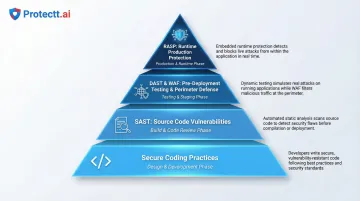
RASP works best alongside complementary security controls:
- SAST (Static Application Security Testing): Finds vulnerabilities in source code before deployment
- DAST (Dynamic Application Security Testing): Tests running applications for exploitable weaknesses
- WAF (Web Application Firewall): Filters malicious traffic at the perimeter
- Secure Coding Practices: Prevents vulnerabilities from being introduced before they reach code
Each layer addresses different attack vectors at different stages. Together, these controls create a defense posture no single tool can achieve alone.
Test for performance impact before production
RASP instruments the runtime directly, so benchmark response times and memory usage under realistic load during staging. Warning signs of misconfiguration include:
- Latency increases exceeding 20% for critical transactions
- CPU utilization spikes during normal operations
- Increased garbage collection pause times (for JVM-based apps)
- Memory leaks or unusual memory growth patterns
Frequently asked questions
What is RASP (runtime application self-protection)?
RASP is a security mechanism embedded within an application's runtime that monitors execution behavior in real time and blocks attacks—such as SQL injection and XSS—before they cause damage, without requiring changes to application code.
What are RASP used for?
RASP detect and block runtime attacks, protect against zero-day exploits that signature-based tools miss, maintain compliance audit trails, and secure applications in production environments where traditional perimeter defenses fall short.
What is the difference between DAST and RASP?
DAST is a pre-deployment testing method that probes an application from outside to discover vulnerabilities before release. RASP operates inside the running application in production to detect and block active attacks in real time. The two serve complementary roles at different SDLC stages.
Is RASP the same as a WAF?
No. WAFs filter incoming traffic at the network perimeter using predefined rules, while RASP operates inside the application with visibility into execution context—making RASP better at blocking attacks that bypass perimeter defenses or involve legitimate-looking requests.
Does RASP affect application performance?
Modern RASP are designed to minimize overhead, but poorly configured agents can introduce latency. Best practice is to test in staging under realistic load and choose tools explicitly designed for zero or near-zero performance impact.
Can RASP protect mobile applications?
Yes. Mobile-specific RASP address threats unique to mobile environments—rooting, hooking, APK tampering, and overlay attacks. Purpose-built mobile RASP SDKs for iOS and Android are distinct from web/server RASP solutions and necessary for any enterprise deploying customer-facing mobile apps in regulated industries.