
Introduction
Android APKs can be decompiled in minutes using free tools like JADX or ByteCode Viewer, exposing Java/Kotlin source code, internal API paths, and business logic. For apps in banking, fintech, and insurance — where apps embed proprietary logic and sensitive data directly in the application layer — that exposure is a serious business risk.
This guide covers:
- What Android app obfuscation is and why it's a baseline security requirement
- How the core techniques work and which tools to use
- Where obfuscation falls short — so development and security teams can apply it strategically, not by default
Many teams enable minifyEnabled = true in Gradle and assume their app is protected. It isn't. That flag enables build optimization — not security-grade obfuscation — and the gap leaves apps open to reverse engineering attacks that go well beyond basic decompilation.
TL;DR
- Android app obfuscation transforms readable bytecode into deliberately unreadable code at compile time, without changing runtime behaviour
- Core techniques include identifier renaming, string obfuscation, control flow obfuscation, and instruction substitution — production apps layer several together
- ProGuard and R8 deliver basic obfuscation as a byproduct of optimization — security-grade protection requires dedicated tools or enterprise platforms
- Obfuscation defeats static analysis but does not block runtime attacks; high-stakes apps need complementary protections like RASP
- For regulated sectors like banking and fintech, obfuscation is a foundational compliance requirement, not optional hardening
What is Android app obfuscation?
Android code obfuscation is a compile-time process that transforms human-readable bytecode into a deliberately confusing format (renaming identifiers, encrypting strings, and scrambling control flow) while ensuring the application behaves identically at runtime.
The process is designed to make decompiled code useless to an attacker by removing the readable structure that would reveal algorithms, API keys, authentication logic, or business rules. Done well, it pushes the cost of reverse engineering from minutes to weeks.
Obfuscation differs from related concepts:
- Encryption protects data at rest or in transit; obfuscation protects compiled code structure
- Minification shrinks file size as a side effect; obfuscation targets readability directly
- Compilation converts source code to bytecode; obfuscation deliberately obscures that bytecode after the fact
The goal is to defeat both human analysts and automated deobfuscation tools — making static analysis produce noise instead of insight.
Why Android apps need code obfuscation
The decompilation threat
Android APKs are ZIP files containing DEX bytecode. Any attacker can unzip an APK and use free tools to reconstruct near-original Java/Kotlin source code within minutes. Research using JADX shows a failure rate of just 0.02% failed methods per app on average, meaning decompilation is highly reliable.
A 2025 ACM longitudinal study analyzing 500,000+ APKs confirms that 92.5% of the top 1,000 Google Play apps use obfuscation, compared to only 61.9% of lower-ranked apps. Top-tier developers clearly treat obfuscation as a baseline requirement.
Intellectual property and business logic exposure
Without obfuscation, proprietary algorithms, internal API endpoints, scoring models, and unique transaction workflows are visible to competitors and attackers. For fintech and banking apps, this means exposing:
- Fraud detection logic and risk scoring algorithms
- Custom cryptographic implementations
- Payment processing flows and transaction validation rules
- Authentication mechanisms and session management logic
App piracy and repackaging risk
Attackers can lift unprotected code, embed malware or adware, repackage the APK with a near-identical UI, and distribute it through unofficial channels.
The threat data backs this up:
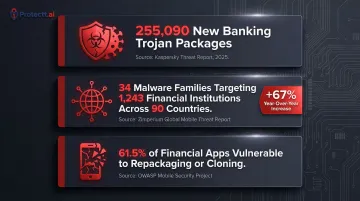
- Kaspersky reported 255,090 new banking Trojan installation packages in 2025, representing a several-fold increase over previous years
- Zimperium tracked 34 active malware families targeting 1,243 financial institutions across 90 countries, with a 67% year-over-year increase in Android malware-driven financial transactions
- A Promon study testing 384 financial services apps found that 236 (61.5%) were susceptible to repackaging or cloning attacks
Regulatory and compliance drivers
Obfuscation supports compliance with data protection and application security standards across multiple frameworks:
| Standard | Requirement | Obfuscation Relevance |
|---|---|---|
| PCI DSS v4.0.1 – Req. 6.2.4 | Software engineering techniques must "prevent or mitigate all common software attacks" | Assessors expect obfuscation, root detection, and integrity attestation as runtime controls |
| OWASP Mobile Top 10 – M7 | Lack of binary protection classified as an explicit security risk | OWASP states "the app binary should be made incomprehensible" |
| GDPR | Data controllers must implement technical measures appropriate to risk | Obfuscation is recognized within defense-in-depth strategies |
| RBI Master Circular on Mobile Banking | Mobile banking technology must ensure confidentiality, integrity, and authenticity | Logical security measures must protect software from unauthorized access and tampering |
How Android code obfuscation works
Obfuscation is applied at the bytecode level during the compilation step via Android Gradle Plugin, not at the source code level. Developers write and maintain clean, readable code; the obfuscated version only exists in the compiled APK delivered to users.
The process operates across multiple targets:
- Class, method, and field names
- String literals and configuration values
- Control flow sequences and arithmetic operations
Keep rules (in ProGuard/R8 configuration files) protect identifiers that must remain unchanged for reflection, serialization, or third-party SDKs.
Identifier renaming
Class, method, and variable names are replaced with short, meaningless tokens (e.g., com.example.UserAuthManager becomes a.b.c). This is the most widely used technique, and both ProGuard and R8 include it by default.
Key limitation: While names are garbled, the structural logic, call patterns, and data flow remain intact and are still interpretable by a skilled reverse engineer. Academic research confirms that identifier renaming reduces readability for humans but does not hide underlying structure, API calls, or control flow.
String obfuscation
String literals embedded in code—including API endpoint URLs, internal keys, error messages, and configuration values—are encrypted or encoded at build time and decrypted by a small runtime function only when needed.
Without this, sensitive constants remain visible as plaintext in the decompiled APK even after identifier renaming has been applied. String obfuscation using AES encryption prevents attackers from extracting API keys, endpoint URLs, and authentication tokens through static analysis.
Control flow obfuscation
The logical execution path through the code is scrambled using dummy conditional branches, opaque predicates, redundant loops, and rearranged statement blocks.
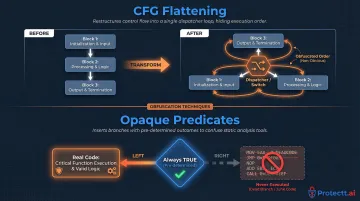
Control Flow Graph (CFG) Flattening is a primary technique. Research demonstrates that a simple algorithm like a Fibonacci function processed with CFG flattening can produce dozens of lines of XOR operations and bit shifts that are functionally equivalent but practically unreadable. The original sequential and looping basic blocks are transformed into a massive switch statement with a central dispatcher, forcing reverse engineers to trace execution order.
CFG flattening is reinforced by a second mechanism: opaque predicates — conditional statements whose outcome is known at obfuscation time but computationally difficult for deobfuscation tools to deduce. As formalized in the Collberg taxonomy, these predicates introduce artificial conditional jumps that always behave as unconditional jumps at runtime, with unused branches filled with dead code or junk instructions to mislead static analysis.
Together, CFG flattening and opaque predicates defeat the structural pattern matching used by both human analysts and automated deobfuscation tools — making control flow obfuscation the defining characteristic of security-grade protection, not just build-time optimization.
Popular obfuscation tools for Android
A critical distinction must be understood: ProGuard and R8 are code optimizers whose primary design goal is reducing app size and improving runtime performance. Obfuscation is a byproduct, not a security design intent.
ProGuard
ProGuard is an open-source optimizer (the default tool before AGP 3.4) that performs code shrinking, bytecode optimization, and identifier renaming. Developers configure it via .pro files, where keep rules define which classes and methods must not be renamed.
Security limitation: ProGuard was not designed with attackers in mind—it renames identifiers to reduce DEX size, not to confuse analysts. The resulting code is harder to read but retains structural integrity. String constants remain visible in plaintext unless additional tools are layered on top.
R8 compiler
R8 is Google's replacement for ProGuard (default in AGP 3.4+). It uses the same ProGuard rule syntax but applies more aggressive optimizations including method inlining, class merging, and identifier shortening.
R8 is enabled for release builds by setting isMinifyEnabled = true in the app-level Gradle build script. Full mode (android.enableR8.fullMode=true) is enabled by default as of AGP 8.0, applying significantly more powerful optimizations including changing method and field visibility.
Security limitation: R8's obfuscation is a size-reduction side effect, not a security feature. Specifically, it:
- Does not encrypt string constants
- Does not obfuscate control flow logic
- Provides no runtime protection against dynamic attacks
R8 is the correct baseline for all release builds — but these gaps make it insufficient as a standalone security measure.
Advanced and enterprise obfuscation tools
Each gap R8 leaves — unencrypted strings, transparent control flow, no runtime defense — is addressed by purpose-built security tools. dProtect (OpenObfuscator) and DexGuard add string encryption, control flow flattening, arithmetic obfuscation, and class encryption. These are designed specifically to frustrate security analysts, not to shrink APKs.
Comparison of tool capabilities:
| Feature | R8/ProGuard | dProtect | DexGuard |
|---|---|---|---|
| Primary Purpose | Code shrinking & optimization | Enhanced static obfuscation | Enterprise RASP & anti-tampering |
| Identifier Renaming | Yes | Yes | Yes |
| String Encryption | No | Yes | Yes |
| Control Flow Obfuscation | No | Yes | Yes |
| Code Virtualization | No | No | Yes |
| RASP/Anti-Hooking | No | No | Yes |
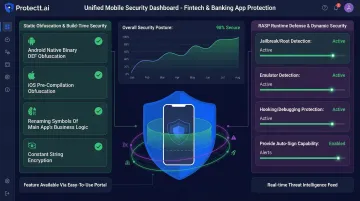
Enterprise platforms like Protectt.ai extend this further by combining advanced code obfuscation with Runtime Application Self-Protection (RASP) — delivering static obfuscation at build time alongside active runtime defense against hooking, tampering, and reverse engineering. For banking, fintech, and insurance apps, this layered approach addresses what static-only tools cannot: attacks that occur while the app is running.
Limitations and misconceptions about Android code obfuscation
The most dangerous misconception
Enabling minifyEnabled = true in a release build does not make an app secure. This setting activates R8's optimizer, which produces identifier renaming as a side effect. Many development teams mark obfuscation as "done" at this step, unaware that string constants, control flow, and class structure remain fully accessible in the decompiled output.
What obfuscation cannot stop
Obfuscation is a static-analysis deterrent; it has no effect on runtime attacks. Tools like Frida can attach to a running process and hook into decrypted, deobfuscated code in memory. Using Frida's APIs (Java.perform and Interceptor.attach), attackers can intercept function calls, read memory, and alter return values in real-time.
Obfuscation also does not protect against:
- Root/jailbreak bypass
- SSL pinning circumvention
- Man-in-the-middle attacks
- Debugger attachment
- Emulator detection bypass
These operate at a different layer entirely and require runtime protection mechanisms.
When obfuscation is insufficient as a standalone control
Apps processing financial transactions, storing authentication tokens, or collecting sensitive personal data face adversaries willing to invest significant effort in dynamic analysis. For these use cases, obfuscation should be one layer in a defense-in-depth stack that also includes:
- Anti-tampering detection
- Root and jailbreak detection
- Runtime integrity monitoring
- Debugger and emulator detection
- API security and network protection
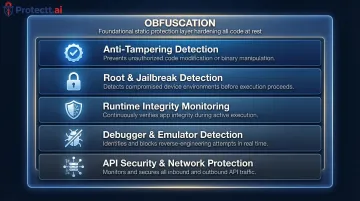
RASP (Runtime Application Self-Protection) platforms fill this role by detecting and blocking Frida-based hooking, root detection bypass, and SSL pinning circumvention at runtime. Protectt.ai's RASP solution, for example, combines these runtime defenses with static obfuscation to provide full-stack mobile app protection.
When obfuscation may be unnecessary
Static libraries, internal tools not distributed externally, and open-source apps have less justification for obfuscation. Applying aggressive obfuscation without well-defined keep rules frequently causes runtime crashes when reflection-dependent code (e.g., serialization frameworks, dependency injection) has its class names stripped.
Conclusion
Android code obfuscation is a foundational security practice that transforms readable bytecode into a form that defeats automated static analysis and discourages casual reverse engineering. It protects intellectual property, reduces the viability of app cloning, and supports compliance in regulated industries.
These properties make it a required step in any Android release pipeline.
Understanding obfuscation means knowing both its value and its limits. Teams that treat ProGuard or R8 as a security solution rather than an optimizer will leave their apps exposed to runtime attacks.
The right approach is layered protection — strong obfuscation at the code level, combined with runtime defenses that monitor and respond to attacks while the app is running.
For banking, fintech, and insurance applications, this means deploying security-grade obfuscation tools that go beyond identifier renaming to include string encryption and control flow obfuscation. Pair that with RASP capabilities that detect and block dynamic instrumentation, hooking frameworks, and device compromise.
Together, these controls ensure that determined attackers encounter meaningful resistance at both the static analysis and runtime stages — where most mobile app compromises actually occur.
Frequently asked questions
What is code obfuscation in Android?
Android code obfuscation transforms compiled bytecode into a deliberately unreadable format at build time, preserving full app functionality while blocking reverse engineering. It shields embedded business logic, API keys, and proprietary algorithms from exposure through static analysis.
What are the obfuscation techniques used in Android?
The four main techniques are:
- Identifier renaming — replaces class and method names with meaningless tokens
- String obfuscation — encrypts constants and literals at rest
- Control flow obfuscation — scrambles execution paths using opaque predicates and dead code
- Instruction substitution — swaps operations for functionally equivalent but complex alternatives
Production apps typically layer several of these together. Control flow obfuscation offers the strongest protection against skilled analysts.
What is ProGuard Android?
ProGuard is an open-source optimizer and code shrinker that was the default build tool for Android before R8 replaced it in AGP 3.4. It performs identifier renaming and code shrinking but was designed for size optimization, not security, and has largely been replaced by R8 for modern Android development.
Why is obfuscation required in a mobile application?
Android APKs are easily decompiled, exposing intellectual property and embedded secrets. Obfuscation raises the cost of reverse engineering, protects against app cloning and piracy, and supports security compliance requirements in regulated sectors like banking and fintech where obfuscation is a standard baseline control across top-ranked apps.
Is code obfuscation legal?
Code obfuscation is entirely legal and a standard industry practice for protecting intellectual property. It is permitted under Google Play policies and is used by the vast majority of commercially successful Android apps to prevent unauthorized reverse engineering and cloning.
Is deobfuscation illegal?
Deobfuscating your own app or conducting personal security research is generally legal in most jurisdictions. Deobfuscating a third party's app to steal intellectual property, bypass licensing, or distribute tampered versions may violate copyright law, computer fraud statutes, and app store terms of service.