Introduction
Banking apps process high-value transfers. Insurance platforms handle sensitive claims. Investment apps execute trades in real time. When any of these are compromised, the damage goes beyond the individual user — it hits institutions with fraud losses, regulatory penalties, and reputational harm.
The challenge for security teams isn't just verifying who is logging in. It's confirming that the right person is using the right device — and that nothing has been tampered with in between.
Mobile device binding addresses this directly. It cryptographically ties an app instance to a specific physical device, making stolen credentials useless without that device in hand. This guide explains how device binding works, how to implement it, where it falls short, and how it defends against session hijacking, credential theft, and account takeover attacks that cost financial institutions billions each year.
TLDR
- Device binding creates a cryptographic link between a mobile app and specific hardware, ensuring the app only functions on the registered device
- Uses asymmetric cryptography and hardware-backed secure storage (Android Keystore, iOS Secure Enclave) to keep private keys non-exportable
- Protects against session token theft, credential replay, SIM swap fraud, and emulator-based attacks
- Banking, fintech, and insurance sectors rely on it to satisfy regulatory mandates including PCI DSS, RBI guidelines, and regional financial compliance frameworks
- Protectt.ai's Zero Trust Device & SIM Binding ties hardware identity to network-level verification, blocking account takeovers even when credentials are compromised
What is mobile device binding?
Mobile device binding is a security mechanism that establishes a unique, verified association between a specific mobile app instance and a specific physical device. Once binding is complete, the app can only be accessed and operated on the device it was registered to — no exceptions.
Without device binding, a stolen session token or compromised credential can be replayed from any device, anywhere in the world. An attacker in a different country could use your intercepted login token to access your bank account from their phone. Device binding makes stolen credentials useless without physical access to the original hardware.
Instead of relying solely on username and password, device binding uses device-specific identifiers — particularly hardware-backed cryptographic keys that cannot be extracted or copied. The mechanism works through three core elements:
- Hardware-backed key generation: Keys are created inside secure hardware (Android's Trusted Execution Environment or Apple's Secure Enclave) and never leave the device
- Asymmetric key storage: The server stores the public key; the device keeps the private key locked in hardware
- Signed request verification: Every app request must be signed with that private key, proving it originates from the legitimate device
Device binding vs. SIM binding
These two approaches differ in what they anchor identity to:
| Feature | Device Binding | SIM Binding |
|---|---|---|
| What it ties to | Phone hardware (cryptographic keys in TEE/Secure Enclave) | SIM card and mobile network number |
| Security level | High: Private keys are non-exportable | Moderate: Vulnerable to SIM-swap attacks |
| Primary protection | Prevents device cloning, credential replay | Verifies mobile number possession |
| Attack resistance | Resistant to token theft and emulator use | Vulnerable to SS7 interception and SIM swapping |
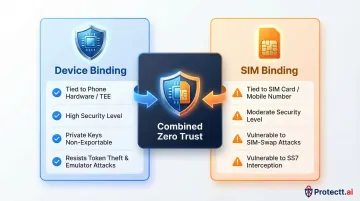
Used in isolation, each method has gaps. Combining both creates a stronger Zero Trust identity posture — device-level cryptographic verification confirms the hardware, while network-level mobile number validation confirms the SIM. Protectt.ai's platform implements exactly this layered approach, pairing hardware-bound keys with silent carrier-network verification to close both attack surfaces simultaneously.
How mobile device binding works
Device binding is built on asymmetric (public-key) cryptography. When a device registers, it generates a key pair — a public key shared with the server and a private key that never leaves the device. That separation is the foundation of the entire trust model.
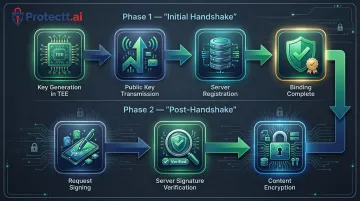
The initial handshake
When a user first logs into an app, the registration flow unfolds:
- Key generation: The device generates a cryptographic key pair inside the Trusted Execution Environment (TEE)—Android Keystore on Android, Secure Enclave on iOS
- Public key transmission: The app sends the public key to the backend server over HTTPS
- Server registration: The server stores the public key against that user's account, establishing a trusted device record
- Binding complete: The device is now bound; the server will only accept requests signed by the corresponding private key
Why TEE matters: The private key lives inside hardware-secured storage — inaccessible to software, malware, or the OS. That hardware isolation is what makes device binding genuinely resistant to token theft.
Post-handshake communication
Every subsequent request follows a strict verification protocol:
- Request signing: Every API call is signed with the device's private key, creating a unique digital signature that proves the request originated from the bound device
- Server verification: The server checks the signature against the stored public key — a match confirms legitimacy; a mismatch (from any other device) triggers immediate rejection
- Content encryption: The server can encrypt sensitive data using the device's public key before transmission, so only the bound device can decrypt it — protecting data even if files are physically copied
Implementing device binding: Android vs. iOS
Android and iOS each expose distinct hardware security APIs — knowing which to use, and which to avoid, is where most implementations succeed or fail.
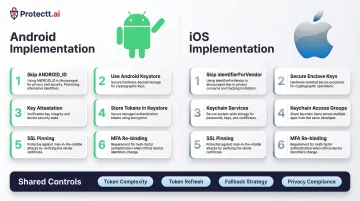
Android implementation
Android device binding requires abandoning legacy identifiers and embracing hardware-backed security:
Key steps:
- Skip
ANDROID_ID: Since Android 8.0, it is scoped per app-signing key and resets on reinstall, making it unreliable for persistent binding - Use Android Keystore: Generate keys targeting
TRUSTED_ENVIRONMENTorSTRONGBOXsecurity levels to ensure hardware backing - Implement Key Attestation: Android Key Attestation gives your server cryptographic proof that the key is hardware-backed, closing the door on software-level key spoofing
- Store tokens in Android Keystore:
EncryptedSharedPreferenceswas deprecated in 2024 — use Keystore encryption directly - Enforce SSL pinning: Transmit all tokens and sensitive data over HTTPS with certificate pinning
- MFA-gated re-binding: When a user switches devices, require multi-factor re-authentication before establishing trust on the new device
Samsung Knox note: On Knox-enabled devices, if tampering is detected the Knox Warranty Bit trips permanently — all device-bound data becomes inaccessible. Factor this into your re-binding fallback design.
iOS implementation
iOS device binding leverages Apple's Secure Enclave and strict sandboxing:
Key steps:
- Skip
identifierForVendor: It resets if the user removes all apps from your vendor, making it unsuitable for persistent binding - Generate keys in Secure Enclave: Set
kSecAttrTokenIDtokSecAttrTokenIDSecureEnclave— this produces 256-bit elliptic curve keys that cannot be exported under any circumstances - Use Keychain Services: Store keys in the iOS Keychain, sandboxed per app and encrypted on disk
- Keychain Access Groups: Share binding data securely across multiple apps from the same vendor without exposing raw key material
- Enforce SSL pinning: All server communication must use HTTPS with certificate pinning
- MFA-gated re-binding: Require multi-factor re-authentication when users change devices
Shared security considerations
Regardless of platform, these controls apply to every device binding implementation:
- Token complexity: Use 35+ character strings with alphanumeric and special characters to resist brute force
- Periodic token refresh: Rotate binding tokens regularly to limit the exposure window if a token is compromised
- Fallback mechanisms: Design re-binding flows for factory resets or OS updates that may invalidate identifiers
- Privacy compliance: Hardware-backed cryptographic keys are GDPR-friendly pseudonymous identifiers — unlike MAC addresses or IMEIs, which are classified as personal data
Key benefits of mobile device binding
Stops session token replay attacks
Even if an attacker intercepts a valid session token through network sniffing or malware, it's useless without the private key bound to the original device. The server will reject any signed request from a different device, eliminating one of the most common attack vectors in mobile banking fraud. According to Kaspersky's 2025 report, banking trojan attacks on Android surged 196% year-over-year—device binding neutralizes these credential theft attacks.
Prevents account takeover from credential theft
Username and password alone no longer grant access when device binding is enforced. This raises the cost and complexity of account takeover attacks—critical for financial apps handling high-value transactions. IBM's 2024 Threat Intelligence Index recorded a 266% increase in infostealing malware, making device-level authentication a necessity rather than an option for any app handling sensitive transactions.
Enables regulatory compliance
Financial regulators worldwide now mandate strong device-level authentication:
- Reserve Bank of India (RBI): Authentication Mechanisms Directions, 2025 (effective April 1, 2026) mandates dynamic 2FA for all digital payments, explicitly moving away from SMS-OTP toward device binding
- FFIEC (US): Warns that simple device identification is ineffective and demands complex digital fingerprinting and layered security
- PCI DSS v4.0.1: Requires phishing-resistant multi-factor authentication for cardholder data access

Protectt.ai holds PCI DSS certification, confirming its device binding implementation satisfies each of these regulatory standards directly.
Builds user trust through zero-friction security
When implemented with hardware-backed keys and silent background verification, device binding adds strong security without forcing users through additional authentication steps on every transaction. Protectt.ai's Zero Trust Device & SIM Binding applies exactly this principle: device-level cryptographic verification works alongside network-level mobile number validation to deliver continuous, background protection with no added friction for the end user.
Limitations and challenges of device binding
User inconvenience during device changes
When users upgrade, lose, or replace their phone, the re-binding process can be complex and frustrating. Organizations must design secure but usable re-authentication workflows—typically MFA-gated—to re-establish trust on the new device. Poor implementation creates support burden and user abandonment.
Progressive re-authentication works well here: use SMS OTP or biometric verification to confirm identity before allowing re-binding, keeping the process secure without adding unnecessary friction.
Technical complexity and maintenance overhead
Implementing device binding correctly across Android and iOS requires significant development effort:
- Different identifier APIs and deprecation cycles (e.g.,
ANDROID_IDchanges,identifierForVendorvolatility) - Platform-specific TEE behaviors and OS version constraints
- Ongoing maintenance as platforms evolve (e.g., Google's new ECDSA P-384 root certificate for Android Key Attestation by March 2026)
- Scalable backend infrastructure for managing tokens across millions of users
This isn't a one-time build — it requires dedicated mobile security expertise and a monitoring strategy that keeps pace with platform changes.
Privacy and legal considerations
Certain device identifiers may be classified as personal data under GDPR. GDPR Recital 30 explicitly states that online identifiers provided by devices can be used to create profiles and identify individuals. The UK ICO and EDPB classify MAC addresses and device fingerprints as personal data.
The practical fix is to avoid static hardware IDs altogether and use hardware-generated cryptographic keys instead. The EDPB's 2025 Guidelines on Pseudonymisation confirm that cryptographic algorithms — where the secret key stays secure — prevent linking stored data back to any individual. Because the private key never leaves the device, the server holds only the public key, which cuts privacy exposure significantly and eases GDPR compliance.
Frequently asked questions
What is mobile device binding?
Mobile device binding is a security technique that cryptographically ties a mobile app to a specific device using cryptographic keys stored in secure hardware (Android Keystore or iOS Secure Enclave). This ensures the app can only function on the registered device, preventing credential or token reuse from any other device.
What is device binding in banking?
In banking, device binding ensures that a mobile banking app can only be accessed from the customer's registered smartphone. Even if login credentials are compromised, an attacker cannot access the account from a different device—protecting transactions and customer data from account takeover and fraud.
What is device binding on Samsung Android devices?
On Samsung Android devices, device binding uses the Android Keystore to generate and lock cryptographic keys to the device. Samsung's Knox Vault adds a dedicated secure processor for hardware-level isolation, making private key extraction resistant even against sophisticated attacks.
What does "device binding blocked" mean?
"Device binding blocked" appears when an app detects that the current device is not the one registered during setup. This occurs when accessing the app on a new phone, after a factory reset, or in an emulator/cloned environment. Users must complete a re-binding process (usually involving MFA) to restore access.
How does device binding differ from SIM binding?
Device binding ties security to the phone's hardware via cryptographic keys stored in secure hardware (TEE/Secure Enclave). SIM binding verifies identity through the SIM card and mobile network. Protectt.ai's Zero Trust Device & SIM Binding combines both approaches, creating stronger, multi-layer identity assurance.
Can device binding be bypassed by attackers?
Device binding is robust when keys are stored in TEE/Secure Enclave, but rooted or jailbroken devices can undermine it. Zimperium's 2025 report found compromised devices are 3.5× more likely to be targeted by malware. Pairing device binding with RASP and hardware attestation closes this gap.