Introduction
When a user downloads your mobile app, the compiled code lands directly on their device—outside your network perimeter, beyond your firewall, and completely outside your control. Freely available decompilation tools can strip away the binary layers of Android DEX files and iOS executables in minutes, exposing your business logic, API keys, authentication flows, and proprietary algorithms to anyone with basic technical skills.
Once your app leaves the store, it becomes a static artifact that attackers can dissect, modify, and redistribute at their leisure.
This vulnerability isn't theoretical. Research from NowSecure found that 95% of mobile apps fail at least one category of the OWASP Mobile Application Security Verification Standard, while nearly one in five contain hardcoded encryption keys: credentials that reverse engineering tools extract in seconds.
The consequences range from intellectual property theft and cloned apps flooding third-party stores, to credential harvesting that enables account takeovers and payment fraud at scale.
This guide covers the full spectrum of mobile app code protection: what it is, the threats it defends against, the core techniques teams must implement — obfuscation, encryption, anti-tampering, and runtime protection — and how to build a layered defense strategy that keeps both your code and your users secure.
TLDR
- Mobile app code protection prevents attackers from reading, reverse engineering, or tampering with your application's source code through techniques like obfuscation, encryption, and runtime monitoring
- Core threats include reverse engineering for IP theft, repackaging with malware, static analysis to extract hardcoded secrets, and API abuse using stolen credentials
- Protection techniques span static defenses (obfuscation, encryption) and runtime defenses (RASP) — layering both delivers the strongest coverage
- Unprotected apps expose business logic, user data, and API credentials—creating direct pathways for fraud, data breaches, and regulatory violations
- Industry mandates like PCI DSS, GDPR, and RBI guidelines increasingly require code protection as part of secure software development
What is mobile app code protection and why it matters
Mobile app code protection refers to a set of security measures applied to application code to make it resistant to reverse engineering, unauthorized access, cloning, and modification—without disrupting functionality for legitimate users. These protections address a fundamental exposure risk: when you distribute an app via Google Play or the Apple App Store, you're handing compiled code (DEX bytecode for Android, Mach-O binaries for iOS) to millions of devices where attackers can analyze it using freely available decompilation tools like JADX, Ghidra, or Hopper.
The core exposure problem
Unlike server-side code that remains behind secure infrastructure, mobile app code is inherently exposed. An attacker who downloads your app can:
- Decompile the binary to recover near-source-level code
- Extract hardcoded API keys, authentication tokens, and encryption keys
- Map out business logic and data handling routines
- Identify security vulnerabilities to exploit
- Modify the code and redistribute it as a malicious clone
This is a routine process that threat actors execute daily, requiring no specialized infrastructure. Research shows that 23.5% of enterprise mobile devices have sideloaded applications installed, many of which are repackaged versions of legitimate apps injected with malware, adware, or credential-stealing code.
What's at stake: IP theft and user harm
The risks fall into two categories:
Intellectual Property Theft: Attackers clone your app or steal proprietary algorithms, undermining your competitive advantage and revenue. In competitive markets, reverse-engineered apps can appear on third-party stores within days of your official launch, carrying your features but none of your quality controls or security protections.
User Harm: Extracted credentials, API keys, and business logic enable attackers to build fraudulent apps, conduct account takeovers, bypass payment controls, and harvest user data at scale. When attackers extract API keys from your mobile app, they can impersonate legitimate app instances and make unauthorized API calls. This exposure is widespread: 99% of organizations encountered API security issues in the past year, with 95% of attacks originating from authenticated sources.
The regulatory and compliance dimension
These risks are precisely why regulators in banking, fintech, insurance, and government have moved from guidance to hard requirements. Standards now treat mobile app security as mandatory, not advisory:
- PCI DSS v4.0.1 explicitly names Runtime Application Self-Protection (RASP) as a suitable control for protecting payment applications
- GDPR Article 25(1) mandates "data protection by design and by default," requiring controllers to implement technical safeguards—which necessarily includes code protection for mobile apps processing personal data
- OWASP MASVS (Mobile Application Security Verification Standard) dedicates an entire category (MASVS-RESILIENCE) to app hardening, requiring obfuscation, integrity verification, and tampering detection
- Reserve Bank of India guidelines explicitly require code obfuscation and recommend root/jailbreak detection for financial apps
For regulated sectors, failing to implement these controls isn't just a security gap—it's an audit finding that can trigger penalties, enforcement action, and forced remediation timelines.
Common threats that exploit unprotected mobile app code
Reverse engineering and repackaging
Reverse engineering is the foundation of most mobile app attacks. Attackers use decompilation tools to convert your compiled app back into readable code, analyze its structure and logic, then inject malicious code—malware, adware, or credential stealers—before repackaging and redistributing it as a rogue app on third-party stores.
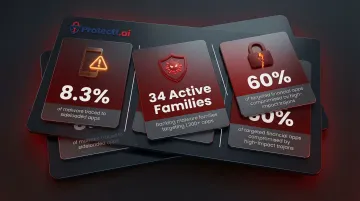
Zimperium found that 8.3% of all malware detections on devices traced directly to sideloaded applications, with riskware and trojans accounting for 80% of these threats. Users who download what appears to be your legitimate app from an unofficial source instead get a compromised version that steals credentials, intercepts transactions, or exfiltrates personal data.
The financial sector is a prime target: 34 active banking malware families currently target over 1,200 financial apps, with high-impact trojans like TsarBot, CopyBara, and Hook compromising 60% of targeted applications. These aren't theoretical threats—they're active campaigns generating real financial losses.
Static and dynamic analysis attacks
Static analysis attacks examine your app's code without executing it, using automated tools to scan for hardcoded secrets, API keys, authentication tokens, and encryption keys embedded directly in the binary. Nearly half of mobile apps contain hardcoded secrets, including API keys for third-party services, backend endpoints, and cryptographic keys.
For high-risk finance apps specifically, 7.30% of Android finance apps and 1.80% of iOS finance apps contain hardcoded API keys and secrets—credentials that attackers extract in seconds using simple string-searching tools.
Dynamic analysis takes a different approach: attackers run your app in a controlled environment (emulator or instrumented device) and use runtime hooking frameworks like Frida or Xposed to observe live data flows, bypass authentication checks, manipulate transaction values, and intercept API calls. This technique works effectively against apps that rely only on static protections, with no runtime monitoring in place.
Man-in-the-middle and API abuse
Once attackers extract API keys from unprotected app code, they gain the ability to:
- Impersonate legitimate app instances against your backend
- Make unauthorized API calls at automated, industrial scale
- Harvest user data without triggering standard authentication alerts
- Launch credential-stuffing attacks across your infrastructure
99% of organizations reported API security issues within the past 12 months, with the vast majority of attacks originating from authenticated sources—meaning attackers are using legitimate credentials stolen from mobile apps.
When your API keys are embedded in client-side code, you've effectively published your backend access credentials to anyone willing to spend five minutes with a decompiler.
Core code protection techniques every developer should know
Code obfuscation
Code obfuscation transforms source code into a functionally equivalent but human-unreadable form. Unlike encryption, there's no decryption key—obfuscation is purely a readability barrier that makes reverse engineering exponentially more difficult and time-consuming.
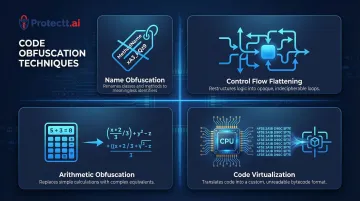
Four Primary Obfuscation Methods:
Name Obfuscation: Renames classes, methods, and variables to meaningless identifiers (
validateUserCredentials()becomesa(),userAuthTokenbecomesb). This strips semantic meaning, making code purpose and flow nearly impossible to follow.Control Flow Flattening: Restructures execution logic into opaque loops and conditional branches. Linear code sequences become tangled webs of jumps and state machines that obscure the original algorithm.
Arithmetic Obfuscation: Replaces simple calculations with complex mathematical equivalents. A simple
x = y + 5might becomex = (y ^ 0x2A) + (0x1F & 0xFF) - 0x25, producing the same result through intentionally convoluted operations.Code Virtualization: Translates portions of your code into custom bytecode executable only by a proprietary virtual machine embedded in your app. This creates a black box that's nearly impossible to reverse engineer without understanding the custom instruction set.
Encryption
While obfuscation hides intent, encryption protects actual data payloads. Coverage spans three domains:
Data at Rest: Encrypt local storage, sandboxed files, database entries, and cached credentials stored on the device. Use platform-provided secure storage mechanisms—iOS Keychain with Secure Enclave and Android Keystore with StrongBox—to protect cryptographic keys and sensitive credentials.
Data in Transit: Enforce TLS 1.3 for all network communication and implement certificate pinning to prevent man-in-the-middle attacks. However, research shows that weak implementations are common: nearly two-thirds of mobile apps use broken or weak encryption algorithms.
Key Management Best Practices: Keep cryptographic keys separate from the data they protect, enforce rotation policies, and use hardware-backed keystores where available. Never hardcode encryption keys in your application code. According to the OWASP Mobile Top 10, insecure key storage consistently ranks among the most exploited vulnerabilities in mobile apps.
AES vs. ECC for Mobile Environments:
According to NIST SP 800-57, the optimal approach for mobile apps is a hybrid model:
AES (Advanced Encryption Standard) for bulk data encryption—it's government-standard, widely supported, and far more performant than asymmetric algorithms for large data volumes. Use AEAD modes like AES-GCM or AES-CCM for combined confidentiality and integrity.
ECC (Elliptic Curve Cryptography) for key establishment and digital signatures—it provides equivalent security to RSA with significantly smaller key sizes, reducing bandwidth usage, storage requirements, and CPU overhead. This translates directly to lower battery consumption and faster cryptographic operations on resource-constrained mobile devices.
Anti-tampering and integrity checks
Encryption secures your data—but anti-tamper controls protect the code delivering it. These mechanisms detect if your app has been modified post-distribution:
- Verify cryptographic hashes of your app's binary at launch (checksum validation)
- Confirm the app's code-signing certificate matches the expected developer signature
- Use platform services like Google's Play Integrity API and Apple's App Attest to verify app authenticity server-side
When your app detects tampering, it must respond decisively: block execution, alert your backend security team, or wipe session data to prevent compromised instances from accessing user accounts or backend systems.
Secure API key and secret management
Hardcoding API keys in mobile apps is a critical vulnerability that remains shockingly common. Alternatives developers should use include:
- Keep API keys on your backend and issue short-lived session tokens to mobile clients instead
- Validate server certificates to prevent MITM attacks that intercept API calls (certificate pinning)
- Use OAuth 2.0 or similar frameworks with short-lived access tokens and refresh token rotation
- For keys that must reside client-side, combine obfuscation with encryption and store them in hardware-backed keystores
The goal is straightforward: minimize the secrets present in your mobile app, and protect the ones that must be there with multiple layers of defense.
Runtime Application Self-Protection (RASP): your active defense layer
RASP represents a fundamentally different protection paradigm. Unlike static protections (obfuscation, encryption) applied before deployment, RASP operates inside your running app and detects and responds to attacks in real time, including on compromised or rooted/jailbroken devices.
What RASP monitors and acts on
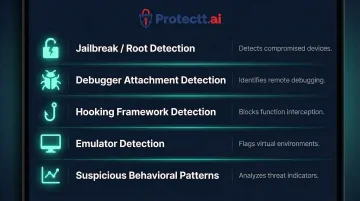
RASP continuously monitors your app's runtime environment for signs of attack:
- Jailbreak/root detection — Identifies if the device has been compromised, allowing your app to refuse execution on insecure platforms
- Debugger attachment attempts — Detects when attackers try to attach debugging tools to inspect your app's memory and execution flow
- Hooking framework detection — Identifies dynamic instrumentation frameworks like Frida and Xposed that attackers use to modify app behavior at runtime
- Emulator detection — Recognizes when your app is running in an emulator rather than on physical hardware—a common analysis environment for attackers
- Suspicious behavioral patterns — Flags anomalies indicating runtime manipulation, such as unusual API call sequences or memory access patterns
When RASP detects threats, it can block execution, alert your security operations center, or gracefully degrade functionality, with no disruption to legitimate users.
The layered value of combining RASP with static protections
Static techniques (obfuscation, encryption, anti-tampering) slow attackers during analysis; RASP stops them if they reach the running app. Banking, fintech, and government security teams increasingly deploy both layers precisely because neither is sufficient on its own.
Consider a real-world attack scenario: An attacker decompiles your app (static analysis), identifies authentication logic, then uses Frida to bypass credential validation at runtime (dynamic analysis). Obfuscation makes the static analysis harder, but RASP detects the Frida framework and blocks execution before the bypass succeeds. Without RASP, the attacker succeeds the moment they move from analysis to execution — regardless of how well the code was obfuscated.
RASP in regulated industries
That attack reality is precisely why regulators governing financial and payment applications have started naming RASP explicitly in their requirements:
- PCI DSS v4.0.1 explicitly names RASP as a suitable control, stating it "can detect and block anomalous behavior by the software during execution"
- OWASP MASVS dedicates multiple controls to RASP capabilities, requiring apps to detect tampering, verify integrity at runtime, and detect debuggers
- Reserve Bank of India guidance goes further, recommending that apps actively check for rooted or jailbroken devices and disable functionality when compromise is confirmed
Protectt.ai's mobile security platform is built specifically for these regulated environments. Its RASP implementation covers 100+ runtime security checks across iOS and Android, integrates via a lightweight SDK, and adds no measurable performance overhead — making compliance-grade protection practical to deploy alongside existing mobile codebases.
Best practices for implementing mobile app code protection
Integrate security from day one (shift left)
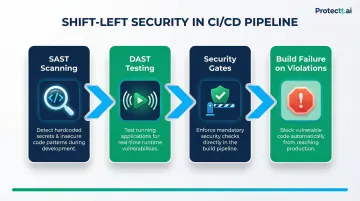
Embed code protection into your CI/CD pipeline rather than bolting it on post-build. This "shift left" approach reduces remediation costs, ensures every release ships with consistent protections, and prevents security from becoming a deployment bottleneck.
Key implementation steps:
- Use SAST (Static Application Security Testing) tools to scan for hardcoded secrets, insecure cryptography, and vulnerable code patterns during development
- Use DAST (Dynamic Application Security Testing) tools to test running apps for runtime vulnerabilities
- Automate security checks as mandatory gates in your build pipeline
- Treat security failures as build failures—don't allow vulnerable code to reach production
Follow the principle of least privilege for code and data
Your app should only request permissions it needs, only store data it must, and never embed credentials or sensitive logic client-side that can be served server-side instead. Specific practices include:
- Request only essential device permissions and explain to users why each is needed
- Avoid caching sensitive data on-device unless necessary
- Treat all data from untrusted sources (user input, API responses, deep links) as potentially malicious
- Escape and validate all data passed to external systems before it leaves the app
Keep libraries, SDKs, and dependencies patched
Third-party components in mobile codebases introduce significant vulnerability exposure. Research shows that 78% of commercial codebases contain at least one high-risk open-source vulnerability, and 91% use components that are ten or more versions out of date.
The supply chain challenge runs deeper on mobile: over 60% of top Android and iOS third-party SDKs ship as pre-compiled binaries, often without a Software Bill of Materials (SBOM), which blocks traditional static analysis tools from assessing their behavior.
Dependency management practices to implement:
- Use Software Composition Analysis (SCA) tools to identify vulnerable components
- Set up automated alerting for known CVEs in your dependencies
- Pin library versions and test updates in staging before production deployment
- Vet third-party SDKs carefully: check permissions, network access, and data collection practices
- Maintain an SBOM for compliance and incident response purposes
Frequently asked questions
What is app code protection?
App code protection refers to techniques like obfuscation, encryption, anti-tampering controls, and RASP that prevent attackers from reading, copying, or modifying mobile application source code. These protections operate transparently, securing your app without disrupting the experience for legitimate users.
How to protect data from mobile applications?
Encrypt data at rest using platform-provided secure storage (iOS Keychain, Android Keystore) and data in transit using TLS 1.3 with certificate pinning. Avoid storing sensitive data locally, apply secure key management, and deploy runtime protections to block exfiltration through compromised apps.
What are the best practices for mobile app security?
A layered approach covers the most ground. Key practices include:
- Implement code obfuscation and anti-tamper controls
- Enforce strong authentication and secure your APIs
- Apply SAST/DAST testing against secure coding standards
- Deploy RASP to detect and block attacks at runtime
Is mobile code safe?
Distributed mobile app code is vulnerable to decompilation and reverse engineering unless you actively protect it. Without obfuscation, encryption, and runtime monitoring, your app's business logic, API keys, and sensitive data are accessible to anyone with basic reverse engineering skills.
Should I have my app protection on or off?
App protection should always be enabled for production apps, especially those handling user credentials, payments, or personal data. Disabling protection creates a direct window for reverse engineering and tampering attacks, exposing both your intellectual property and your users to significant risk.
What are the best practices to keep software libraries secure?
Run regular dependency audits with SCA tools to flag known CVEs, pin library versions to prevent unexpected updates, and restrict dependencies to well-maintained components with active security patching. Review and update libraries quarterly or whenever critical vulnerabilities are disclosed.